3Commas Trading Bot: How It Works & When to Upgrade

3Commas is a subscription-based crypto trading terminal: you link it to your exchange account, choose a bot type — a DCA (dollar-cost-averaging) bot, a grid bot, or a Signal Bot that automates trades based on external alerts — set the parameters, and the platform executes trades on your behalf according to that logic. It doesn't hold your funds, and it isn't a guaranteed profit machine; whether it works for you depends on how well you understand the mechanics behind the bot, not just the marketing copy on the pricing page. This article skips the usual pricing recap and pros/cons list you've already read elsewhere and instead walks through how the bots actually decide when to trade, what a genuine profitability check looks like, and the point where templated logic stops being flexible enough for traders who want to build their own rules.
What Is 3Commas? How Crypto Trading Bots Actually Work
3Commas is a smart trading terminal — a piece of software that sits between you and your exchange account, giving you tools (bots, manual order panels, portfolio views) that most exchanges don't offer natively. It works through exchange API integration: you generate an API key on Binance, Coinbase, Kraken, or another supported exchange, grant it trade permissions, and paste that key into 3Commas. From that point on, 3Commas can place, modify, and cancel orders on your exchange account, but it never takes custody of your coins — they stay on the exchange itself.
A crypto trading bot, in this context, is just a set of pre-programmed rules: "buy X amount when price drops by Y%," or "sell when price rises Z% from the average entry." The bot doesn't predict the market; it mechanically executes a rule every time the condition it's watching becomes true. That's the whole concept before you even get into DCA or grid variants — and it's exactly the same principle traders eventually want more control over, which is why visual, no-code builders like Quberas exist alongside terminals like this one: to let you see and shape that rule logic directly, rather than trusting a fixed template.
Key Features: Bots, Smart Trade, and the Trading Terminal
3Commas organizes its functionality around a small number of tools: preset bots, a manual Smart Trade panel, and the terminal that ties both to your linked exchanges.
How a DCA Bot Averages Into a Position
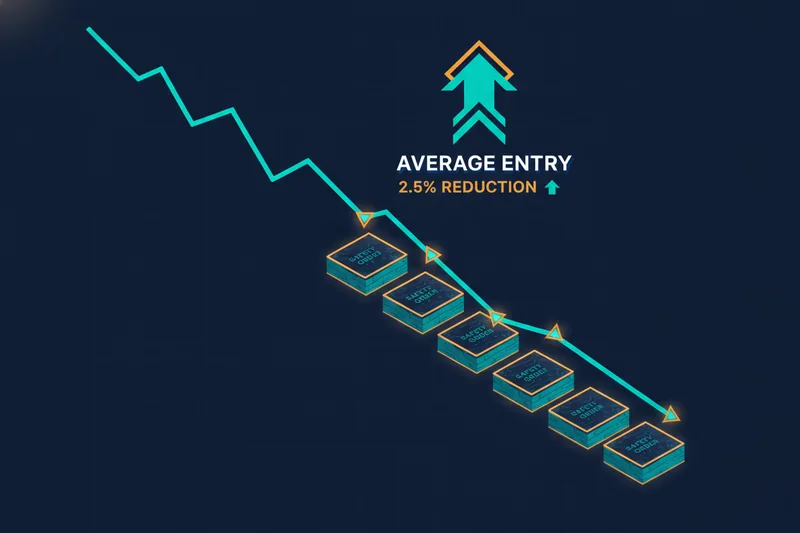
A DCA bot opens a base order, then adds "safety orders" at set price intervals if the market moves against the position, lowering the average entry price as it goes. It's worth noting that DCA in its strict definition means buying or selling at regular intervals over a fixed schedule, rather than only adding at progressively lower prices — 3Commas' version blends both ideas, combining scheduled entries with price-triggered safety orders. You configure the safety order size, price deviation, and how many safety orders the bot can place before it stops.
How a Grid Bot Trades a Price Range
A grid bot takes the opposite approach: instead of averaging into one directional position, it places a ladder of buy and sell orders across a price range you define, profiting from price oscillating up and down within that band. It performs best in sideways, range-bound markets and struggles when price breaks decisively out of the grid in one direction.
Is 3Commas Safe and Legit?
The safety question usually comes down to custodial vs non-custodial access. 3Commas never holds your crypto — funds remain on your exchange account, and the platform only interacts through the exchange API integration you configure. The real security control is how you scope that API key: most exchanges let you disable withdrawal permissions entirely, so even if the key were compromised, an attacker could place trades but not move funds off the exchange. That single setting is the most important security decision in the whole setup.
Because 3Commas runs as a hosted, cloud-based terminal, you're not responsible for keeping a bot running on your own machine around the clock — which matters, since self-hosted or self-coded bots typically need a dedicated server (a VPS) to stay online reliably for live trading, even though a home PC can work fine for testing. That operational burden simply doesn't apply to a terminal-based platform like this one.
Are 3Commas Bots Profitable? Looking Beyond the Generic Reviews
There's no single answer to bot profitability — it depends entirely on the market conditions a given DCA or grid configuration was built for, and whether you validated it before risking capital.
Why Backtest Results Don't Guarantee Live Performance
Backtesting runs your bot's rules against historical price data to see how it would have performed. It's useful for ruling out obviously broken configurations, but a backtest can't account for slippage, liquidity gaps, or the fact that market conditions during the tested period may never recur. Treat a good backtest as a filter, not a forecast.
Why 'Why Did This Trade Trigger?' Is the Real Profitability Question
The more useful question isn't "did this bot make money in the past" — it's "why did this specific trade fire, and was that the right reason?" A safety order that triggers on every minor dip rather than a meaningful pullback is a sign of false signals caused by loose parameters, not a working strategy. Threshold tuning — adjusting deviation percentages, indicator settings, or grid spacing until trades trigger on the conditions you actually intended — matters more to real-world results than the headline backtest return. Sound risk discipline still applies regardless of platform: frameworks like the 3-5-7 rule, which caps risk at 3% per trade, 5% across all open positions, and requires a 7% minimum profit-to-loss ratio, are a useful sanity check against any bot's default settings.
Templated Bots vs Custom Logic: Where Preset DCA and Grid Bots Hit a Ceiling
3Commas' DCA and grid bots are parameter forms: you fill in deviation percentages, safety order counts, and grid boundaries, but you can't add an indicator crossover, a volume filter, or a nested "if this AND not that" condition to the entry logic itself. That's fine for straightforward setups, but it becomes limiting once you want a bot to react to more than price distance alone.
A no-code strategy builder built around visual, nested conditions takes a different approach: instead of filling parameter fields, you assemble entry, averaging, exit, and stop-loss stages as a connected deal map, combining price action, indicators, volume, and crossovers into rules that can require several things to be true at once. Paired with a visual debugger that highlights the exact chart zone where each condition passed, "almost," or failed, you can see precisely why a trade did or didn't happen — not just infer it from a trade log. That visibility is the actual ceiling templated bots hit: they execute rules well, but they don't help you understand or reshape the rules themselves.
3Commas Pricing Plans, Pros, and Cons
3Commas is structured in tiers, moving from a limited free entry point up through paid plans that unlock more simultaneous bots, more exchange connections, and advanced tools like the Smart Trade panel. Exact allowances change over time, so check current plan pages rather than relying on cached figures — but the general shape (free/limited, mid-tier, higher-tier with expanded bot count and features) has stayed consistent.
Pros:
- Broad exchange support through direct API integration
- Established DCA and grid bot templates that don't require configuration from scratch
- A Smart Trade panel for manual orders alongside automation
- An active bot marketplace for copying preset strategies
Cons:
- Bot logic is limited to preset parameters, not custom nested conditions
- Backtesting doesn't fully substitute for live-market validation
- Profitability depends heavily on manual threshold tuning most users skip
- Subscription cost stacks with any marketplace or copy-trading fees
3Commas Alternatives: When to Look Beyond Preset Bot Templates
Automated trading tools generally fall into a few categories: full coding environments, no-code/low-code builders, signal-to-execution layers, and marketplaces of pre-built bots. 3Commas sits mainly in the last two — preset bots plus a strategy marketplace — which is exactly why it's a strong fit for traders who want a working bot fast, and a weaker fit once you want to design the logic yourself.
For that second group, the natural next step is a no-code strategy builder where rules are constructed visually rather than filled into template fields, with a deal map structure for multi-stage entries and exits, a visual debugger for confirming why a trade triggered, and a strategy marketplace for launching either a custom build or a ready-made one. Quberas is built specifically around that gap — for traders who've outgrown parameter-only bots and want to see their logic, not just trust it.
How to Get Started: Setting Up Your First Bot
- Create API keys on your exchange with trade permissions enabled and withdrawal permissions disabled.
- Connect the exchange through the platform's exchange API integration settings.
- Choose a bot type (DCA or grid), set your base order size, safety order rules, and take-profit targets.
- Run a backtest against recent historical data and review where trades would have triggered.
- Start on a small allocation before scaling up, and monitor early live trades against your backtest expectations.
If you get through that process and find yourself wanting to add a condition the templates can't express — an indicator filter, a volume threshold, a rule that only fires when two signals align — that's the point to try building it visually instead of forcing it into a preset. See exactly how your strategy's logic triggers on the chart — build and backtest a custom, no-code trading bot free with Quberas.